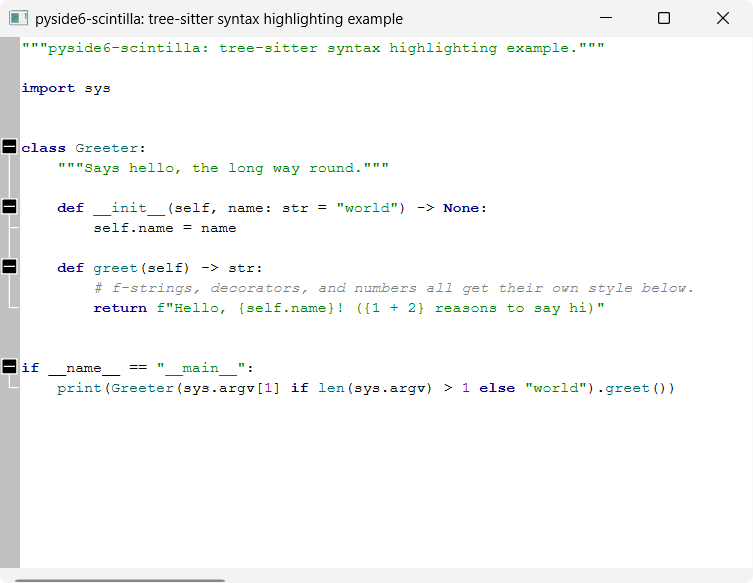
tree-sitter syntax highlighting and folding
A minimal QMainWindow with a ScintillaEdit central widget, showing Python
syntax highlighting and code folding driven by
tree-sitter.
pyside6-scintilla doesn't wrap a lexer binding, so there's no
SCI_SETLEXER to flip on. Instead, tree_sitter_highlighter.py parses the
editor's text with a tree-sitter Language (here, tree-sitter-python) on
every edit and:
- runs a highlight
Queryover the resulting tree and applies the captured node ranges manually viaScintillaEdit's rawSCI_STYLE*messages (styleSetFore(),startStyling(),setStyling(), ...); - walks the tree's
blocknodes (the indented body of any compound statement) to compute each line's fold level and applies it viasetFoldLevel()— the same message a real lexer would drive folding with, wired to a standard "boxes" fold margin.
Both re-run on every edit via the editor's modified signal.
tree_sitter_highlighter.py has no dependencies beyond pyside6-scintilla,
tree-sitter and a tree-sitter language package — copy it straight into
your own project, same as bscintillaedit.py.
main.py itself stays a thin PySide6 app shell, and owns the hand-written
highlight query (HIGHLIGHTS_QUERY) for Python, since the query is
grammar-specific and not part of the reusable highlighter.
TreeSitterHighlighter.rehighlight() re-parses and re-queries the whole
buffer on every edit, which is fine at example/small-file scale but won't
scale to large files — a production version would use tree-sitter's
incremental parsing (Parser.parse(..., old_tree=...)) and restyle/refold
only the changed range instead.
Note
HIGHLIGHTS_QUERY is a small, hand-written query covering keywords,
strings, numbers, comments, function/class names, and calls — not the
full capture set you'd get from a real grammar's highlights.scm (e.g.
from nvim-treesitter).
Anything not captured falls back to the default style.
Note
Folding is keyed off the Python grammar's block node alone (any
indented compound-statement body) — good enough for
if/for/while/def/class/etc., but a grammar with other foldable
constructs (e.g. multi-line collections, import groups) would need more
node types in fold_levels().
Note
A TreeSitterHighlighter instance is bound 1:1 to one ScintillaEdit at
construction — it can't highlight multiple widgets by itself. To
highlight several editors, create one instance per widget:
highlighter_a = TreeSitterHighlighter(editor_a, language, HIGHLIGHTS_QUERY)
highlighter_b = TreeSitterHighlighter(editor_b, language, HIGHLIGHTS_QUERY)
This also matches how Qt's own QSyntaxHighlighter attaches to one
QTextDocument at a time. Note that styling is per-view, not
per-document — even if two editors share an underlying document via
setDocPointer(), each still needs its own highlighter.
TreeSitterHighlighter is a QObject. Pass a parent (e.g. the window
that owns the editor, as main.py does) to tie its lifetime to that
object instead of keeping an explicit reference around:
TreeSitterHighlighter(editor, language, HIGHLIGHTS_QUERY, parent=window)
Running
From the repo root, after uv sync:
uv run python examples/highlighting/tree_sitter_highlighting/main.py
tree-sitter and tree-sitter-python are dev-only dependencies of this
repo, used solely for this example — they are not dependencies of the
pyside6-scintilla package itself.
Source
examples/highlighting/tree_sitter_highlighting/
Screenshots