Lexilla syntax highlighting and folding
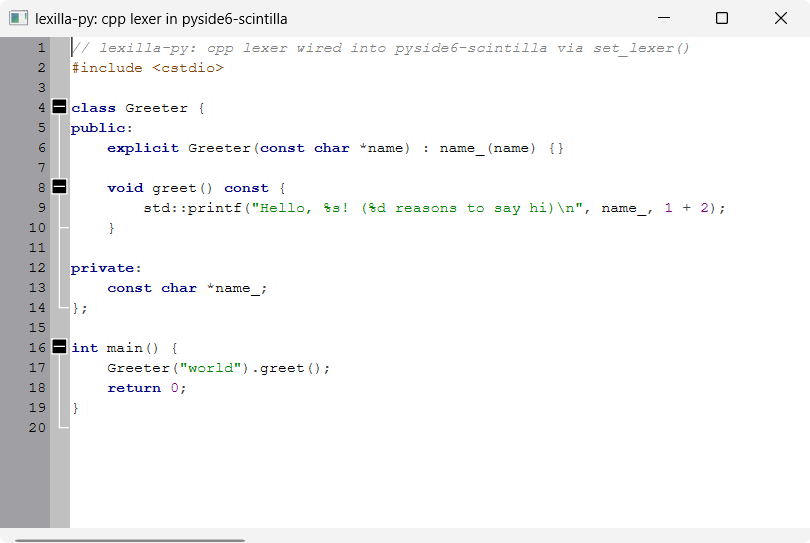
A minimal QMainWindow with a ScintillaEdit central widget, showing real
C++ syntax highlighting driven by a
lexilla-created "cpp" lexer — the
cross-binding pointer path described in lexilla-py's
docs/specs/mission.md
"Cross-binding integration" decision:
from lexilla import Language, create_lexer
from lexilla.pyside6_scintilla import set_lexer

lexer = create_lexer(Language.CPP)
set_lexer(editor, lexer)
set_lexer() hands the lexer's ILexer5* to Scintilla via SCI_SETILEXER
(setILexer()) and takes ownership from there — the Lexer wrapper must not
be used again afterwards. Once wired up, Scintilla calls the lexer's
Lex()/Fold() itself whenever it needs to (re)style text, so — unlike
the pygments_highlighting/tree_sitter_highlighting examples below, which
re-tokenize on every edit because pyside6-scintilla has no lexer of its
own — no per-edit glue code is needed here.
This example still sets the colors per style number itself
(styleSetFore()), and the keyword word list (setKeyWords()) — the lexer
only assigns style numbers (SCE_C_*, from Lexilla's own SciLexer.h) to
ranges of text, the same way SciTE's properties files do for any other
Scintilla-based editor.
Resolving style numbers by name, not hardcoding them
SCE_C_* numbers are baked into the compiled cpp lexer itself
(LexCPP.cxx's own style table), not chosen by lexilla-py — and with 125
vendored lexers, each with its own style set, lexilla-py doesn't generate a
static enum per lexer for them (same staleness risk as any generated enum,
multiplied by 125). Instead it binds ILexer4's real runtime introspection
(borco/lexilla-py#8), so
main.py keys its STYLES_BY_NAME dict by the lexer's own symbolic names
("SCE_C_DEFAULT", "SCE_C_WORD", ...) and resolves them to that lexer
instance's actual style numbers at runtime:
style_by_name = {lexer.name_of_style(s): s for s in range(lexer.named_styles())}
This doesn't make the names themselves discoverable out of nowhere — you
still need to know what a cpp lexer can style before writing
STYLES_BY_NAME, the same way you'd have needed to know the numbers before.
What changes is which part of that knowledge you commit to source: names
are part of Lexilla's stable, documented surface (SciLexer.h's macro
names, mirrored 1:1 by name_of_style()); the numbers are an implementation
detail that can shift between Lexilla versions or with sub-style
allocation. To see the full list of names/descriptions a lexer exposes —
either to write a STYLES_BY_NAME for a different language, or just to
explore — run:
from lexilla import Language, create_lexer

lexer = create_lexer(Language.CPP)
for s in range(lexer.named_styles()):
    print(s, lexer.name_of_style(s), lexer.description_of_style(s))
main.py also asserts STYLES_BY_NAME's keys against this same lookup at
startup, so a typo'd style name fails loudly there instead of as a
confusing KeyError deep in the styling loop.
Margins
Scintilla starts with 5 margins, plain slots numbered 0..Scintilla.MaxMargin
(4) — setMargins(n) can allocate more or fewer. A margin index by itself
means nothing; setMarginTypeN()/setMarginWidthN()/etc. are what actually
give a slot a role (line numbers, symbols, folding, ...), so there's no
Scintilla or pyside6-scintilla enum for "the line-number margin" or "the
fold margin" — only for what you do with a slot once picked (e.g.
Scintilla.MarginType, used in main.py). By convention (not enforced by
Scintilla) margin 0 defaults to line numbers and margin 1 to non-folding
symbols, which is why main.py reuses them for the same roles (as
MARGIN_LINE_NUMBER/MARGIN_FOLD) instead of inventing its own numbering.
To add a third margin yourself — e.g. for git-blame/revision text, or a
bookmark margin distinct from the fold margin — pick an unused index (2, 3,
or 4 here) and give it a role the same way: setMarginTypeN() with
Scintilla.MarginType.Text/RText for application-drawn text (see
marginSetText()), or another Symbol margin with its own
setMarginMaskN() (e.g. Scintilla.MaskHistory instead of MaskFolders)
so its markers don't collide with the fold margin's.
Folding
Setting the lexer's "fold" property to "1" before handing it to
set_lexer() makes Fold() compute fold levels alongside Lex()'s
styling — click the boxed +/- markers in the left margin (class/function
bodies in SAMPLE_TEXT) to collapse/expand them.
setAutomaticFold(Scintilla.AutomaticFold.Click) handles the margin click
itself; no signal/slot code needed.
The marker symbols (Scintilla.MarkerSymbol.BoxPlus/BoxMinus/...) and the
margin-click flag (Scintilla.AutomaticFold.Click) use this repo's real
typed enums.
Running
From the repo root, after uv sync:
uv run python examples/highlighting/lexilla_highlighting/main.py
lexilla is a dev dependency of this repo (used solely for this example) —
it is not a dependency of the pyside6-scintilla package itself. It's
installed from its PyPI release.
Source
examples/highlighting/lexilla_highlighting/
Screenshots