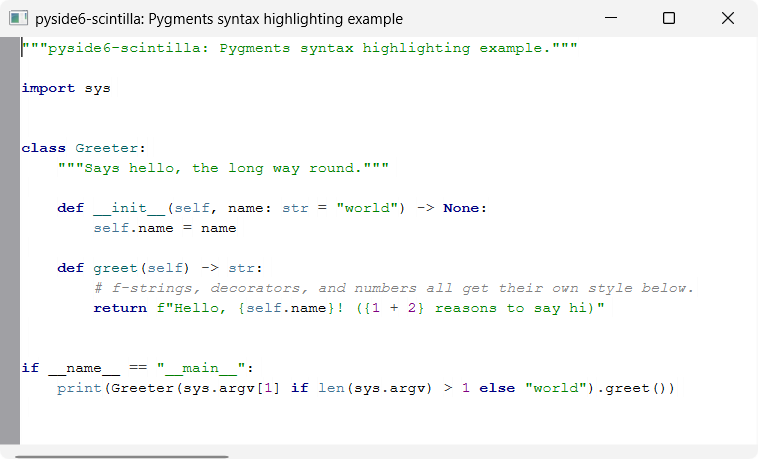
Pygments syntax highlighting
A minimal QMainWindow with a ScintillaEdit central widget, showing Python
syntax highlighting driven by Pygments.
pyside6-scintilla doesn't wrap a lexer binding, so there's no
SCI_SETLEXER to flip on. Instead, pygments_highlighter.py tokenizes the
editor's text with Pygments' lexer/token API and applies the resulting
styles manually via ScintillaEdit's raw SCI_STYLE* messages
(styleSetFore(), startStyling(), setStyling(), ...), re-running on
every edit via the editor's modified signal.
pygments_highlighter.py has no dependencies beyond pyside6-scintilla and
pygments — copy it straight into your own project, same as
bscintillaedit.py. main.py itself stays a thin
PySide6 app shell.
PygmentsHighlighter.rehighlight() re-tokenizes the whole buffer on every
edit, which is fine at example/small-file scale but won't scale to large
files — a production version would restyle only the changed region instead.
Note
A PygmentsHighlighter instance is bound 1:1 to one ScintillaEdit at
construction — it can't highlight multiple widgets by itself. To
highlight several editors, create one instance per widget:
highlighter_a = PygmentsHighlighter(editor_a, PythonLexer())
highlighter_b = PygmentsHighlighter(editor_b, PythonLexer())
This also matches how Qt's own QSyntaxHighlighter attaches to one
QTextDocument at a time. Note that styling is per-view, not
per-document — even if two editors share an underlying document via
setDocPointer(), each still needs its own highlighter.
PygmentsHighlighter is a QObject. Pass a parent (e.g. the window
that owns the editor, as main.py does) to tie its lifetime to that
object instead of keeping an explicit reference around:
PygmentsHighlighter(editor, PythonLexer(), parent=window)
Running
From the repo root, after uv sync:
uv run python examples/highlighting/pygments_highlighting/main.py
Pygments is a dev-only dependency of this repo, used solely for this example
— it is not a dependency of the pyside6-scintilla package itself.
Source
examples/highlighting/pygments_highlighting/
Screenshots