rehuco





Install
The desktop app, rehuco-agent, is the only program here. Either:
- Download an installer from the latest release: a
Windows
.msi, a macOS.dmgor a Linux.AppImage. They are not code-signed yet, so Windows SmartScreen and macOS Gatekeeper will ask you to confirm the first launch. - Or install from PyPI (Python 3.14+):
pip install rehuco-agent, oruv tool install rehuco-agent, then runrehuco-agent.
The .rehu format is still moving, so keep backups of anything you point it at.
What it is
A personal media catalog for the things you collect to learn from and work with — video tutorials, online courses, archives of reference images. Today it is a desktop editor for a resource's details and a browser over the folders that hold them, not for the media itself.
Those details live in a small JSON file — a .rehu — sitting in the folder next to the resource it
describes, one per resource. That's the whole storage model, and the name is its stem.
How it works is one page on the whole system as it stands: the file, the rules that keep it trustworthy, the app's panels, and what isn't built.
What it does
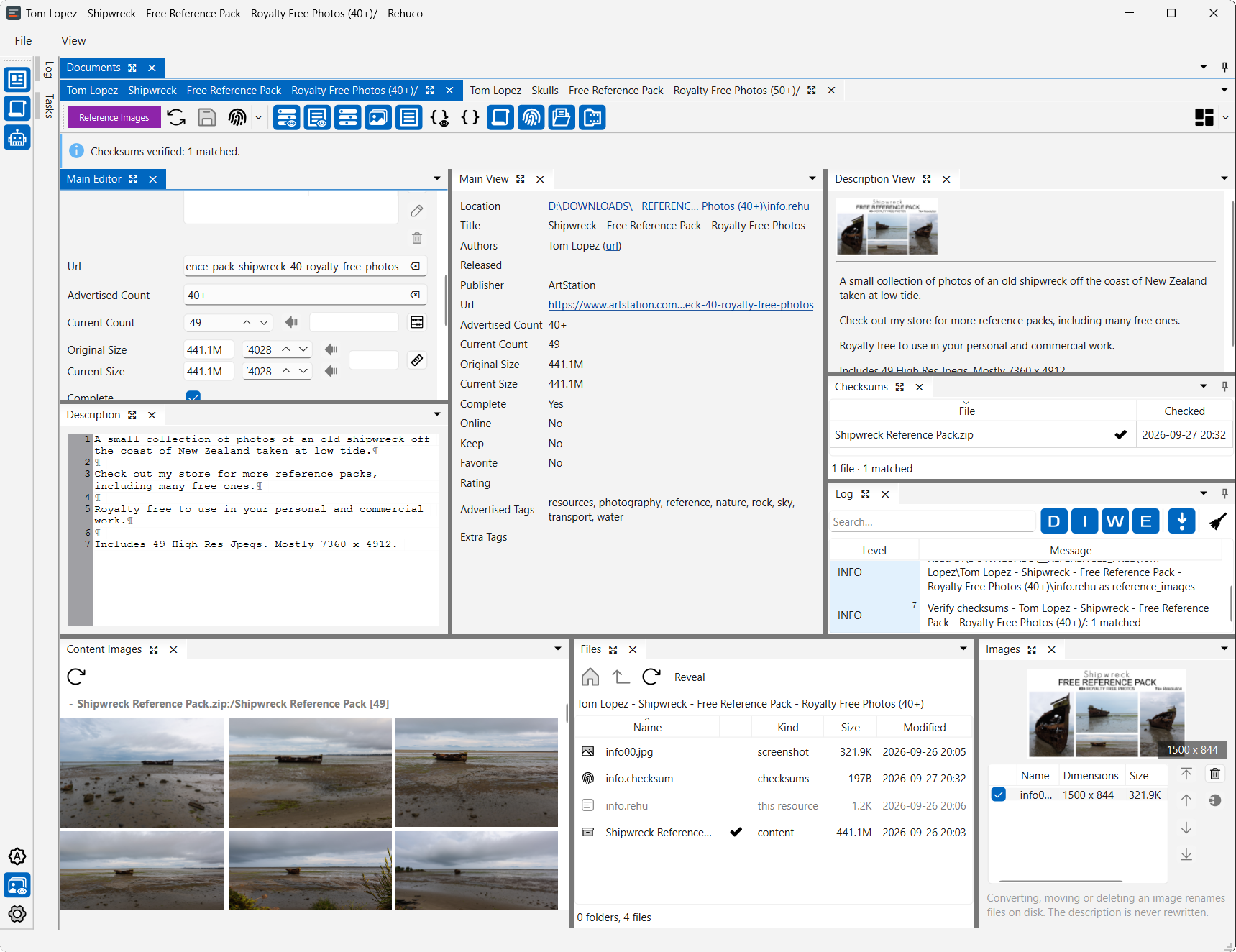
- Edits a resource's details. Open a
.rehufrom the file manager or from the app: title, authors, publisher, release date, URL, durations, sizes, rating, level, tags, flags, and a Markdown description. - Fills those fields from a dropped page. Drop a URL — ArtStation, Udemy, or a user's own scraper script — on the editor to scrape it, and review the result as an ordinary edit before saving.
- Shows its screenshots. A thumbnail strip beside the fields — double-click one to fill the window, arrow keys or the wheel to move through the set, and pick which of them the strip shows. A reference pack also shows its own images, inside its archives and loose in its folders.
- Checks its files. Generates and verifies checksums for one resource or a whole folder, remembering when each file was last checked so a re-run skips what is still fresh.
- Converts legacy
.tccatalogs. One file or a whole folder tree at once: reads the older format, writes.rehu, and keeps backups it can roll back if the conversion goes wrong. - Works in the background. Checksums, imports and scrapes run on a task queue you can pause, reorder and cancel, with a log beside it.
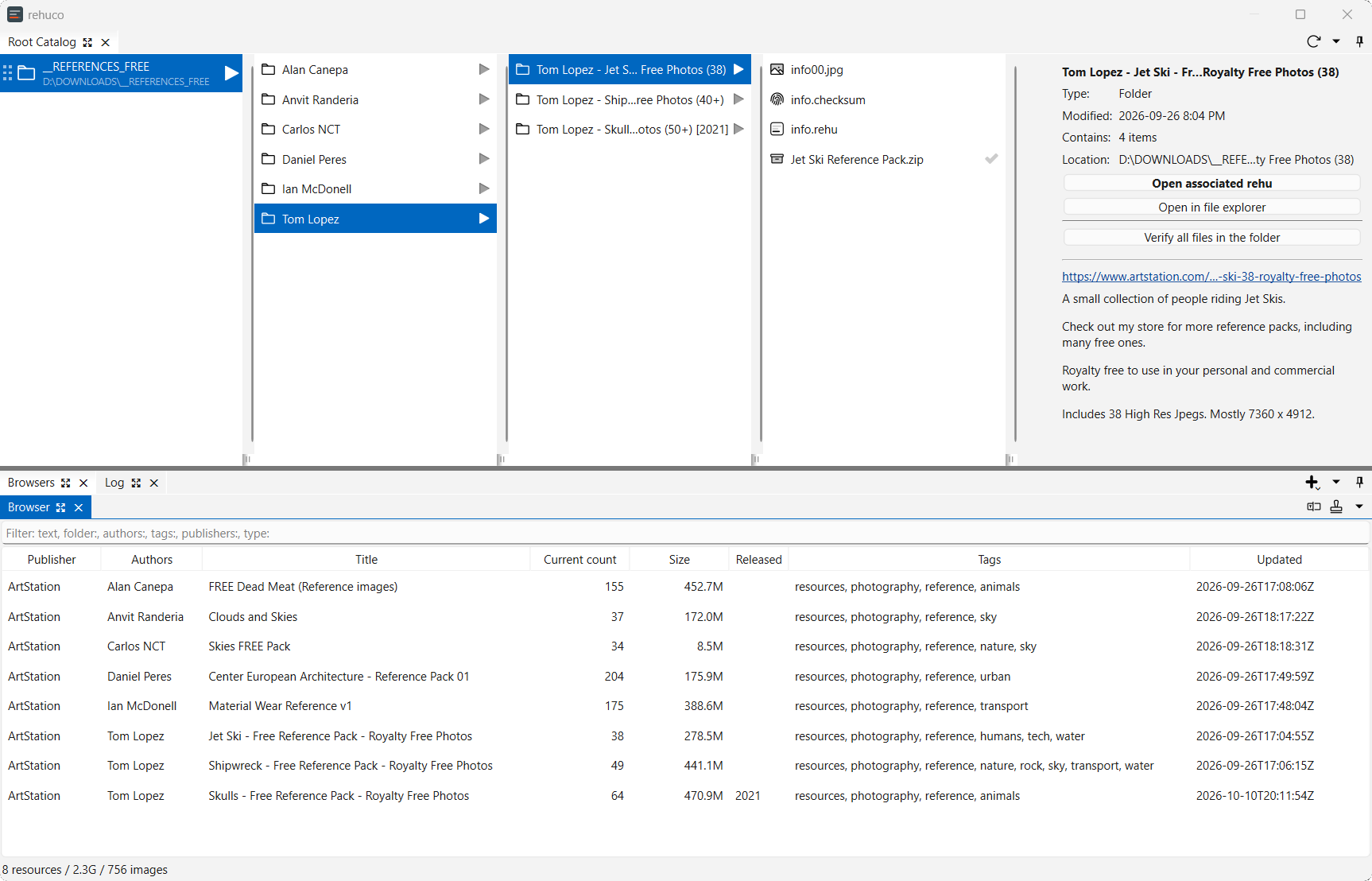
- Catalogs your folders. A
.rehucofile names the folders to catalog; a scan records every.rehuunder them in a rebuildable cache, and filterable tables list the result. A column view of the folders shows each record's details and checksum state, and selecting anything previews it beside the table. - Follows the disk. A record added or edited outside the app is read into the catalog when its folder is listed or its document reloaded, with no Scan needed, and an open document says when its file changed.
- Hands images to other apps. Drag an image out of the app, or press Ctrl+C on it, and Explorer, Finder, PureRef, GIMP, Krita, Blender, a browser or a chat app takes it, the copy named after the resource it came from.
- Doesn't damage what it doesn't understand. Unrecognized fields survive a save untouched, and a file written by a newer version of the format opens read-only rather than being rewritten.
- Keeps your workspace. Atomic saves, and each file's panel layout remembered between sessions.
- Rebinds its shortcuts. A Shortcuts page in Settings lists every command: search by name, description or key, press a key to record it, give a command several keys, and choose where they reach. A key another command already uses is offered to reassign.
Self-describing by design: a .rehu sits next to the content it describes, so reading a resource's
details needs nothing but the file itself — no index, no server, no account.
Tested on Windows, macOS, and Linux.
Where it's going
What's left of the editor is small: a page image picker (a scraping helper, not an editor feature).
What's left of the catalog is filed in the implementation plan.
Past that the design reaches further — playback with progress tracking, web pages and long jobs served by the node, offline borrowing between machines, multi-user access, a browser interface, Daz3D library migration. None of it is implemented, none of it is scheduled, and some of it may never be: it is what the architecture is shaped to allow, and each piece has to earn its place when its turn comes. The design specs explore that territory in depth — as intent, not as a description of the current build.
Maintenance is tracked separately under the audit label — it collects the issues found during a
codebase audit, one sweep at a time.
rehuco packages
rehuco is published as three separate packages on PyPI, all at an early stage — published so the names are taken and the release plumbing is exercised, not because they are ready to depend on.
| Package | Description | PyPI | Downloads | Python |
|---|---|---|---|---|
| rehuco-agent | PySide6 desktop GUI |  |
 |
 |
| rehuco-core | Shared library: models, .rehu I/O, .rehuco and .rehudb cache, legacy .tc reading |
 |
 |
 |
| rehuco-node | The local node: a heartbeat process the agent runs beside itself |  |
 |
 |
Generic libraries (temporarily hosted)
Two generic, reusable libraries under the author's borco namespace are not rehuco-specific. They are
developed in this monorepo for now and will later move to their own repository. If you install them from PyPI,
that move is handled automatically.
| Package | Description | PyPI | Downloads | Python |
|---|---|---|---|---|
| borco-core | Generic reusable classes with no GUI dependency |  |
 |
 |
| borco-pyside | Generic reusable PySide6/Qt classes (e.g. ApplicationSingleton) |
 |
 |
 |